


How it works
Scan and verify: an authenticity check in seconds
Your customers check a product with the free Securicode app. No account, no sign-up, and a clear answer: genuine, or not.
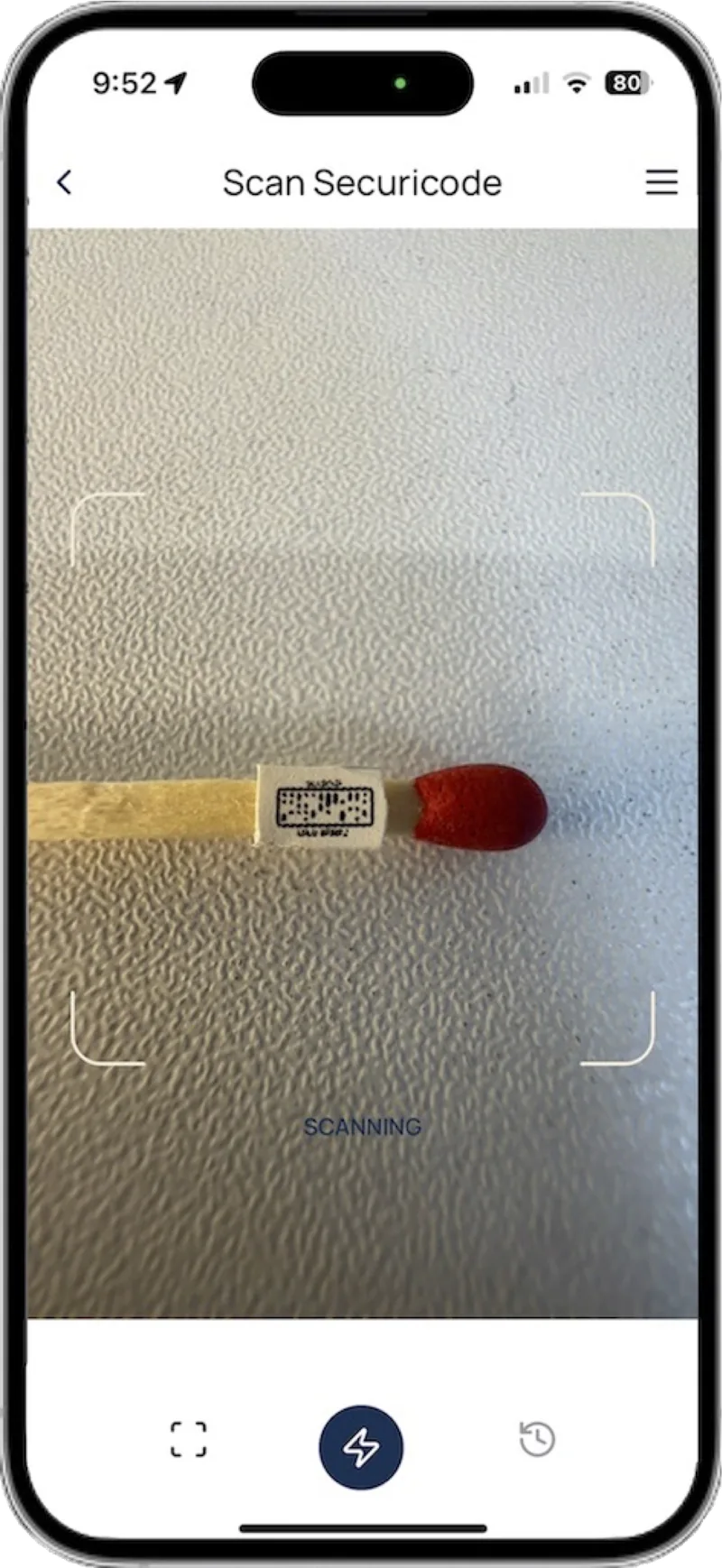
In short
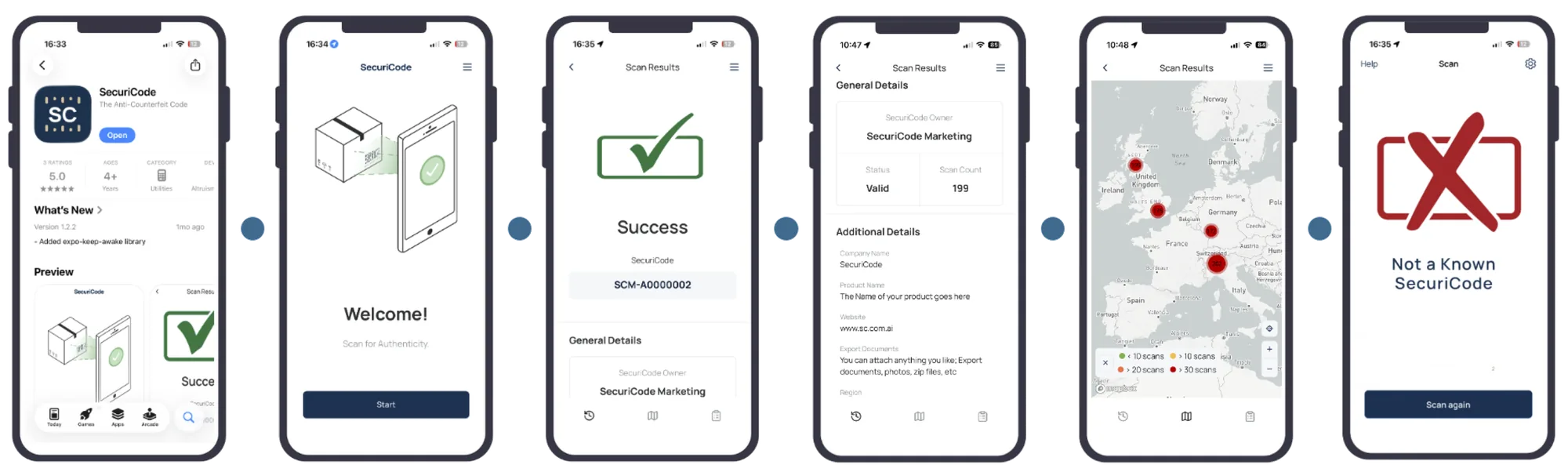
To check authenticity with Securicode, download the free Securicode app for iPhone or Android, open it and scan the small code on the product. The app checks the code against the Securicode database and shows whether it is genuine, the product details the brand has attached, and a map of where that code has been scanned before. A counterfeit shows a cross.
For your customers
How to check authenticity with Securicode
Four steps, and the first one only happens once.
- 1
Download the free app
Search for Securicode in the App Store or Google Play. The app is free and does not ask for an account, name or email.
- 2
Find the code
Look for the small Securicode mark on the label, capsule, care label or the product itself. It can be as small as 1.2mm.
- 3
Scan it
Open the app and hold the phone over the code. The app reads it and checks it against the Securicode database.
- 4
Read the result
See whether the product is genuine, the details the brand has attached, and the scan history for that code.
What a scan shows
What does the app show after a scan?
The result screen is built so a shopper can decide in a few seconds. The brand controls what extra information sits behind each code, and can update it after the product has shipped.
- A clear verdict: genuine, or a cross if it is not
- Product details the brand attaches, such as certificates, documents, images and links
- A scan history map showing where and when that code has been scanned before
- The time, date and place of the scan you just made
How do you read a result?
Most scans end at the first row. The other rows are what a copy, or a problem, looks like.
| What you see | What it means | What to do |
|---|---|---|
| Genuine, with a short scan history in expected places | The code is real and matches the product shown | Nothing more. Check the details match what you bought |
| Genuine, but scanned many times or in many places | The code is real, but it may have been copied onto other items | Look at the scan map. If scans are far from where you bought it, report it |
| A cross | The code is not genuine, or the brand has marked it as counterfeit | Do not rely on the product. Report it to the brand |
| The code does not scan | It may be damaged or badly lit, or it may not be a real Securicode | Try again in better light. If it still fails, report it |
Why does Securicode use an app instead of the phone camera?
It is a fair question, and the one we hear most. A phone camera will open any QR code and follow it wherever it points. That is exactly how fake QR codes work: a counterfeiter prints their own code that leads to a convincing website saying the product is genuine.
The Securicode app only talks to the Securicode database. A code cannot redirect the app to another site, so the answer a customer sees comes from the closed loop, not from whoever printed the label.
Keeping verification inside the app also keeps your data private. Brand and scan data never passes through third parties, including phone makers or web browsers. And because the app records where each scan really happens, criminals and unauthorized factories cannot hide behind a VPN to disguise their location.
The app is free, takes a moment to install, and does not ask for an account, a name or an email address. If someone tells your customer to check a product on a website instead, that is not a Securicode check. See why open QR codes are easy to fake.
Privacy
What does the app collect?
We would rather state this plainly than bury it. Full details are in our privacy policy.
Zero personal data
No sign-up, no name, no email and no password. The app collects no personal data at all.
Time, date and location of each scan
Each anonymous scan records the time, date and location. That is how copied codes are detected, so it is part of how the system works.
Encrypted
Communication between the app and the Securicode servers is encrypted. Scan data is hashed, encrypted and hosted in encrypted form in the cloud.
Evidence, not surveillance
Our app captures the time, date and location of every scan, and court-ready photos of counterfeits. We do not run facial recognition.
For brands: what can you attach to a code?
Lab test results, GMP certificates, care instructions, origin documents, images and links. Pallet codes can carry shipping documents. Attachments can be set per batch or per code, and changed later without reprinting.
Frequently asked questions
How do I check if a product is authentic?
If the product carries a Securicode, download the free Securicode app, scan the code and read the result. If it has no Securicode, check with the brand directly. See our guide for shoppers.
Is the Securicode app free?
Yes. The app is free on iPhone and Android, and there is no account to create.
Why can I not scan a Securicode with my camera app?
Because the camera app follows whatever a code tells it to, which is how fake QR codes send people to fake websites. The Securicode app is a closed loop: it only checks codes against the Securicode database, brand data never passes through third parties such as phone makers or browsers, and the scan location cannot be disguised with a VPN.
Does the app track me?
No. The app collects zero personal data and does not ask who you are. Each anonymous scan records the time, date and location, because that is how copies are detected. Scan records are encrypted, and photos are kept for eight years and cannot be deleted by anyone, not even our own team, so nobody can hack in and delete evidence.
What if the code will not scan?
Try again in good light and hold the phone steady. If it still fails, the code may be damaged or may not be genuine. Report it and we will pass it to the brand.
Keep reading
Make every product provable
Apply for access to create Securicodes for your brand, or book a demo and we will show you a live scan.